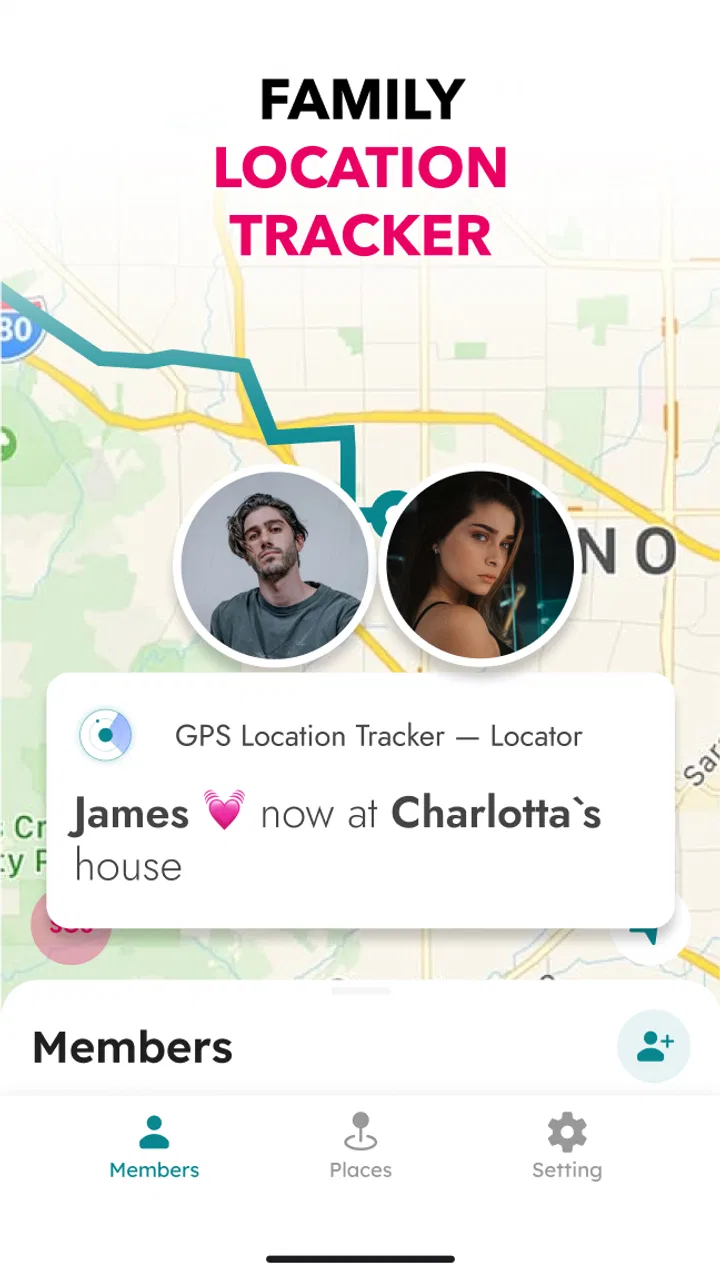
GPS Location Tracker — Locator
- 4.5
- Rating
- 5.00M
- Installs
- Free
- Price

 Analysis by App-foxy
I approached GPS Location Tracker — Locator as a practical lifestyle tool rather than something to keep open all day. Its purpose is straightforward: help people share and follow locations through a phone’s GPS, especially when family members want a simple way to stay connected. After spending time with it, I found that its value depends less on entertainment or customization and more on whether everyone in the group is comfortable with location sharing and the basic habits that come with it.
The app is free to install, with optional in-app purchases ranging from $7.99 to $59.99 per item. It comes from ONSOFFOUR OU and is listed for Everyone, which makes its intended audience broad. The current version is 1.2.1, and it works on Android 7.0 or later. Its average rating is 3.9 from around 37 thousand ratings, while the app has passed one million installs. Those figures suggest that it has reached a sizeable audience, although the rating also hints that the experience is not equally smooth for every user.
How the app feels in everyday use
I find the app most useful when I treat a location check as a quick coordination tool, not a running conversation or a guarantee of someone’s safety. Before relying on it for a trip or meetup, I’d agree with the family on when checking makes sense and what to do if the map position seems unclear. That small routine helps keep the convenience while avoiding unnecessary worry.
You May Also Like

 Blood Strike: 2.5 Anniversary
Blood Strike’s Loadouts Turn Every Drop Into a Tactical Gamble
A close look at Blood Strike’s custom loadouts: how fast access to signature weapons reshapes its battle royale rhythm, rewards preparation, and narrows the gap between fights.

 Pandora - Music & Podcasts
Pandora’s Music Is Easy to Start, but Harder to Recover
Pandora’s strength is its low-effort path from a seed to a station. Its weak spot is how much confidence it asks you to place in connection, setup, and quiet recovery.

 8 Ball Pool
 Is Built on Rivalries, Rematches, and Routine
A close look at the rivalries, rematches, shared routines, and unanswered safety questions that turn a quick pool match into a persistent mobile community.

 Samsung Music
’s Quiet Strength Is Playing What You Already Own
Its reach comes less from spectacle than from dependable access to a personal library. That simplicity is both the app’s strongest retention engine and its ceiling.

 AccuWeather: Weather Radar
AccuWeather Review: A Quick, Clear Forecast for Everyday Decisions
For everyday plans, the best forecast is the one you can understand quickly. AccuWeather makes rain timing, radar, and local conditions easy to act on, with a few trade-offs.

 Hill Climb Racing
Why Hill Climb Racing Still Turns Crashes Into One More Run
A tiny car, a bumpy hill and one more upgrade: Hill Climb Racing keeps resurfacing because its simple chaos makes every near-miss feel personal.
More From Our News Desk



Readability and navigation for quick location checks
The biggest strength of a location tracker is that it should answer one question quickly: where is the person I am trying to find? I found this app most useful when treated as a focused utility. Instead of expecting a large collection of lifestyle tools, I would open it with a specific purpose, check the location view, and close it again. That narrow role helps keep the experience understandable for people who do not want to learn a complicated family-management system.
For a new user, the important mental model is simple. The app connects people, uses GPS information, and presents that information so a family member can check a location. That is easier to explain than a system built around many unrelated features. If I were helping a parent or relative get started, I would first explain who can see whose location, then practise opening the app and reading the map before relying on it outside the home.
That preparation matters because maps can be visually busy. Streets, labels, markers, and moving positions may compete for attention, particularly on a small phone screen. A person with reduced vision may need larger system text, stronger display contrast, or a larger device to make the map easier to interpret. Those adjustments can help, but they are general phone settings rather than a reason to assume that every part of the app has been specially optimized for accessibility.
I also recommend agreeing on a shared routine before using the tracker. For example, a family might decide that a location check is useful when someone is travelling home, arriving at an unfamiliar place, or meeting others in a crowded area. This avoids turning the app into a constant source of questions. The clearest interface still becomes stressful if people do not understand when location information is meant to be checked.
Motor and sensory considerations
Location apps create a particular challenge for people with limited dexterity. The user may need to tap a small map marker, select a person, or move around the map without accidentally changing the view. I would not describe GPS Location Tracker — Locator as automatically effortless for every hand or movement pattern. Someone who has difficulty with precise taps may find map interaction less comfortable than reading a simple text-based status.
A practical workaround is to use a phone with a larger display and keep the device in a stable position rather than trying to operate it while walking. Voice control supplied by the phone may also help with opening the application, although that does not remove the need to understand the location display. If a trusted family member can handle the initial setup, the person who mainly needs to view a location may have a much easier experience afterward.
For users with hearing loss, a visual location display can be more useful than a system that depends heavily on spoken conversation. At the same time, a map does not automatically communicate every important circumstance. It may show where a phone is, but it does not explain whether the person is safe, whether the device is being carried, or whether the location is current enough for the situation. I would never use a map position as a substitute for a direct check-in when safety is genuinely at stake.
People with cognitive disabilities may benefit from the app’s focused purpose, but only if the sharing arrangement is explained in plain language. “Your family can see where this phone is” is clearer than a vague promise to “stay connected.” I would write down the names of the people included, the situations in which the app will be used, and what to do if the displayed position looks wrong. This small preparation can prevent confusion later.
Situational access beyond the home
The most convincing everyday use case is a family member travelling through a busy area. Imagine a parent taking public transport home while another relative is waiting nearby. Instead of sending repeated messages such as “Where are you now?”, the waiting person can check the shared location and decide whether to remain at the meeting point or move closer. This is especially helpful when typing is difficult, the surroundings are noisy, or the traveller is carrying bags.
Another useful situation is a group visit to an unfamiliar place. If people become separated, a location tracker can reduce the need for long phone calls and help everyone move toward the same meeting point. I would still choose a clearly defined physical landmark, because a map marker may place someone on the wrong side of a building, road, or entrance. The app can support coordination, but it should not replace a simple plan.
It can also help relatives who live apart and want an occasional way to check whether someone has reached a destination. The benefit is strongest when the arrangement is mutual and expected. Location sharing becomes much less comfortable when one person feels watched rather than supported. Before adding anyone, I would explain what is being shared and make sure the person understands how the arrangement affects their privacy.
Situational access includes network and device habits, too. A tracker is only useful when the phone is powered, carried by the right person, and able to report its position. A low battery, a phone left in a bag at home, or an interrupted connection can make the displayed location misleading. For that reason, I see this app as a convenience for coordination, not as an emergency service or a guarantee that a family member can always be found.
Where it compares with familiar alternatives
The usual alternative is a messaging app. Messaging is better when the main need is conversation, because someone can explain delays, send a photo, or confirm that they are safe. It is less convenient when several people repeatedly need to ask for a position. GPS Location Tracker — Locator has a clearer role when the question is specifically about location rather than a full conversation.
Another alternative is a built-in phone location-sharing service. Those tools may feel more natural to people who already use the same phone ecosystem, and they can reduce the number of applications a family needs to learn. On the other hand, a dedicated tracker can be easier to explain to relatives who want one focused purpose. The better choice depends on whether simplicity means “one separate app” or “nothing new to install.”
Traditional phone calls remain better for reassurance. A call can reveal tone of voice, confusion, or a problem that a map cannot show. I would combine the two when appropriate: use the tracker to avoid unnecessary back-and-forth, then call when the location looks unexpected or the person may need help. That combination is more realistic than expecting any GPS tool to handle every family situation.
The app is also not the right choice for someone who wants detailed route planning, fitness analysis, or a broad smart-home dashboard. Its appeal is the direct location-sharing purpose. If you want a deep travel record or extensive activity information, a different category of app will probably suit you better. Choosing it because it sounds like a complete family-management platform would create the wrong expectations.
Remaining barriers and points that require care
Privacy is the first barrier. Location information is sensitive, and the convenience of checking a family member’s position should not override consent. I would set up sharing only with people who genuinely need it, explain the arrangement before enabling it, and review the group whenever family circumstances change. A person should not feel pressured to share simply because the app makes sharing possible.
There is also a risk of false confidence. A marker on a map can look precise even when the real-world situation is more complicated. The phone may be indoors, stationary while its owner has moved away, or reporting an older position. I would teach less experienced users to treat the display as a helpful indication rather than an exact promise. That single rule prevents many avoidable misunderstandings.
Cost can become another consideration. The app is free to start, but the presence of optional purchases means families should pay attention before choosing anything that costs money. I would begin with the basic experience and decide whether it genuinely solves the intended problem before considering an upgrade. For people on a tight budget, a messaging app or an existing phone feature may be enough.
The broad Everyone rating does not mean every person will find the interface equally accessible. Older adults, people with low vision, users with tremors, and anyone who finds maps confusing may need assistance. I would test it with the actual person who will rely on it, not just with the family member who installs it. A setup that feels obvious to one person can still be frustrating for another.
There is a social barrier as well. Frequent checking may create tension in families where trust is already fragile. The app cannot solve that problem, and using it as a surveillance tool can make communication worse. I think it works best when the group agrees on reasonable occasions for checking locations and keeps direct conversation available for anything important.
Who will benefit most
I would recommend it to families who want a dedicated way to coordinate movements without turning every update into a message. It is particularly suitable for people who can agree on location sharing, have a compatible Android phone, and prefer a focused tool over a larger collection of features. It may also suit relatives helping someone who occasionally needs orientation during travel or visits to unfamiliar places.
I would be more cautious for users who need highly detailed accessibility controls, text-first navigation, or a guaranteed emergency response. Those users should test the app personally and compare it with tools already built into their phones. Someone who dislikes location sharing on principle should skip it, because no interface improvement makes unwanted tracking feel acceptable.
One useful setup tip is to create a short family guide in ordinary language. Include who is included, when the tracker should be checked, how to identify the correct person, and what to do if the position seems outdated. Keep the instructions next to the phone or share them in a message. This is more valuable than simply installing the app and assuming everyone will understand it.
Another tip is to practise before the first important trip. Have one person move a short distance while another checks the display, then compare what the app shows with the real situation. This reveals whether the map is easy to read, whether the family can identify the right marker, and whether anyone needs a larger screen or assistance. A short rehearsal is especially worthwhile for older users or anyone unfamiliar with GPS maps.
My inclusive verdict
My overall impression is that GPS Location Tracker — Locator is most successful when it stays in its lane: a practical location-sharing app for families who want a quick visual way to coordinate. The free entry point makes it easy to try, and its focused purpose is less intimidating than a crowded all-in-one platform. The reach of over one million installs shows that the idea resonates with many people, while the middling average rating suggests that individual expectations and usability needs can vary.
I appreciate that the concept can support different situations, from meeting someone in a busy place to helping a relative navigate a journey home. It can also reduce typing and repeated calls, which is useful for people dealing with bags, noise, fatigue, or limited dexterity. However, those benefits depend on readable map interaction, a working phone, sensible expectations about GPS accuracy, and a clear agreement about privacy.
The best reason to choose this app is simple, agreed location sharing—not constant monitoring. I would install it for a family that wants a dedicated GPS tracker and is willing to test the experience with the people who will actually use it. I would choose a different option for anyone needing emergency-grade reliability, extensive accessibility customization, or a communication platform that does much more than show where a phone is.
In the end, I see it as a useful support layer rather than a complete solution. Used thoughtfully, it can make ordinary coordination easier and give some users more independence during travel. Used without consent, preparation, or a backup way to communicate, it can create confusion and unnecessary worry. That balance is the key to deciding whether GPS Location Tracker — Locator belongs on your family’s phones.
FAQs for GPS Location Tracker — Locator
01How accurate is the GPS Location Tracker — Locator?
The GPS Location Tracker — Locator app is designed to provide highly accurate location data by using a combination of GPS, Wi-Fi, and cellular networks. However, accuracy can vary based on several factors such as signal strength, geographic location, and environmental conditions. Users in urban areas typically experience better accuracy compared to those in remote regions.
02Does the app work offline or without an internet connection?
The GPS Location Tracker — Locator requires an internet connection to function optimally, as it relies on real-time data and updates. While some basic location tracking might work offline using GPS, features like location sharing and live tracking updates need a stable internet connection for accurate and up-to-date information.
03Is my data secure with the GPS Location Tracker — Locator?
Yes, the app takes user privacy and data security seriously. It employs advanced encryption protocols to protect personal information and location data. Additionally, users have control over who can access their location information, ensuring that data is shared only with trusted contacts as per their preferences.
04What are the main features of the GPS Location Tracker — Locator?
The app offers a variety of features including real-time location tracking, location history logging, geofencing alerts, and the ability to share your location with friends and family. Users can also set up location-based reminders and receive notifications when specific locations are reached or left.
05Are there any subscription fees or in-app purchases?
The GPS Location Tracker — Locator offers a free basic version with essential features. However, to access premium features such as ad-free usage, advanced tracking options, and priority support, users may opt for a subscription plan or in-app purchases. Pricing details are available within the app.
Pros
- Accurate real-time location tracking.
- User-friendly interface for easy navigation.
- Low battery consumption compared to others.
- Customizable alerts for specific locations.
- Supports offline maps for remote areas.
Cons
- Ads can be intrusive at times.
- Limited features in the free version.
- Occasional GPS signal loss in cities.
- Account setup required for full features.
- Data privacy concerns with location sharing.

GPS Location Tracker — Locator
Gallery